
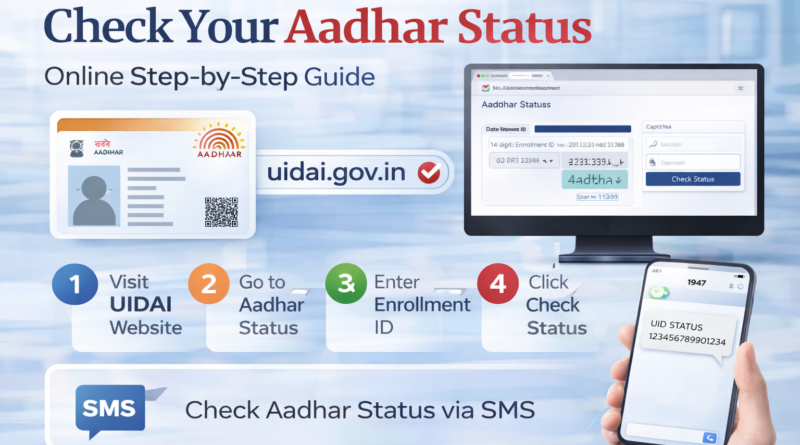
How to Check Your Aadhar Status: A Step-by-Step Guide
Aadhar, the unique 12-digit identification number issued by the Indian government, is one of the most essential documents in India today. It serves as proof of identity and address, and it is linked to several government services and schemes.
One common issue that many people face is checking the Aadhar status, whether it’s for tracking the status of a new Aadhar card application or updating existing details. Luckily, the process to check Aadhar status is easy, and you can do it online in just a few steps.
In this blog post, we’ll walk you through the simple steps to check Aadhar status, ensuring you stay up to date with your Aadhar-related services.
Why Do You Need to Check Your Aadhar Status?
There are various reasons you might need to check your Aadhar status:
- Tracking Aadhar card status: If you’ve applied for your Aadhar card and are waiting for it to be delivered, you can check the current status.
- Checking Aadhar update status: If you’ve requested updates (such as name, address, mobile number, etc.), you can track whether those changes have been processed.
- Verify Aadhar application: Ensure that your Aadhar application was successfully received and processed.
How to Check Your Aadhar Status Online?
The UIDAI (Unique Identification Authority of India) provides an easy online facility for checking Aadhar status. Here are the steps to do so:
Step 1: Visit the UIDAI Website
Go to the official UIDAI website: https://uidai.gov.in/
Step 2: Navigate to the Aadhar Status Page
On the homepage, look for the section labeled “Check Aadhar Status” or you can directly visit the status page here: Check Aadhar Status
Step 3: Enter Your Enrollment ID
To check the status of your Aadhar card, you will need the Enrollment ID provided when you applied for Aadhar. This ID is printed on the Acknowledgment slip you received at the time of your application.
The Enrollment ID consists of a 14-digit number followed by a date and time stamp. Make sure to enter it correctly.
Step 4: Enter the Security Code
You will also be asked to enter a captcha code (security code) to confirm that you are not a robot. It’s a simple step to verify human interaction.
Step 5: Click on “Check Status”
Once you’ve entered the required details, click on “Check Status”. The system will process your request and show the current status of your Aadhar application.
Step 6: View Your Status
After submitting, you will be able to see your Aadhar status, which will indicate whether your application has been processed and your Aadhar card is ready, or if there’s any pending action required.
What Information Will You See on the Aadhar Status Page?
Once you click on “Check Status”, the page will display the following details:
- Your Aadhar status (whether it has been generated or not)
- Your Aadhar number, once it is assigned
- The date of issue for your Aadhar card, if available
- A message confirming whether the card is ready to be dispatched or if there are any issues to be addressed
If your card has been generated, you will receive an option to download the Aadhar e-card or request a physical copy.
How to Track Aadhar Update Status?
If you’ve updated your Aadhar details and are waiting for the changes to be processed, follow these steps:
- Visit the UIDAI website again, and navigate to “Check Aadhar Update Status”.
- Enter your Update Request Number (URN), which you received when you made the update request.
- Enter the security code (captcha), and click “Check Status”.
You will be able to track whether your updates have been successfully processed and linked to your Aadhar card.
Aadhar Status Via SMS
If you prefer not to use the internet or cannot access a computer, you can check your Aadhar status by SMS. Here’s how:
- Send an SMS to 1947 with the following format:
- “UID STATUS <14-digit Enrollment ID>”
- Wait for a response with your Aadhar status.
This is a quick and convenient method if you’re on the go.
What If Your Aadhar Status Is Not Found?
If you’re unable to find your Aadhar status or face any issues, there could be several reasons:
- Enrollment ID Error: Double-check the Enrollment ID and captcha code.
- Processing Delays: Sometimes, there could be a delay in processing. It may take a few weeks for the Aadhar card to be dispatched.
- Application Error: In some cases, the application may have been incomplete or rejected.
In such cases, you can visit the nearest Aadhar enrollment center for assistance or contact UIDAI support via email or phone.
Conclusion
Checking your Aadhar status is a quick and easy process that can be done online, and it’s a helpful way to ensure that your card or updates are on track. Whether you’re waiting for your card, checking updates, or simply verifying your Aadhar status, the UIDAI website and SMS service make it easy to stay informed.
Stay proactive about managing your Aadhar status to ensure that you have access to all the benefits it provides!